Task 5 (6 Marks)
Suggested Time for Task 5: 10 minutes
You need to sign a contract to rent an office.
Click the button below to download the Rental Agreement.
Save a copy of the file in the Section 2 subfolder you created.
a) Enter the following details, where indicated in the file. (2 marks)
- Enter today's date
- Enter your own name
- Enter your signature in the space for The Tenant, by typing your name in Italics
b) Upload the completed Rental Agreement using the Submit Form button below. (1 mark)
You need to pay the deposit and the first month's rent.
Complete the following online payment page using the payment details below.
Amount to Pay: £1975.00
Card Details:
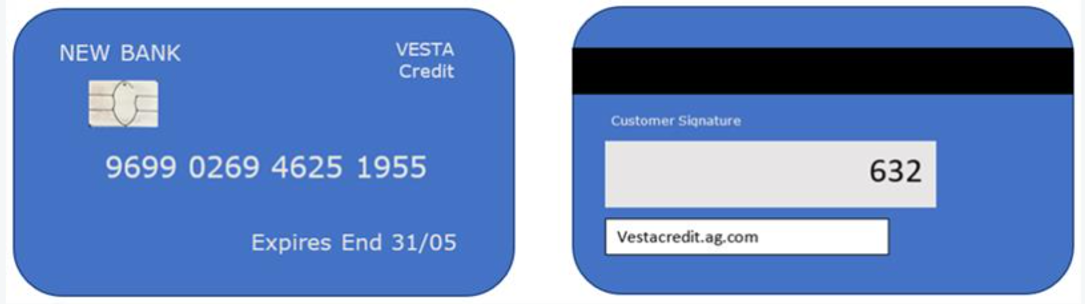
c) Enter the card number and expiry date: (1 mark)
| Card Number | DD | MM |
d) Enter the payment amount in whole pounds and the CVC code: (1 mark)
| Payment Amount (£s) | CVC Code |
e) Enter the Captcha code, exactly as shown, to submit the payment: (1 mark)

|
When you have finished Task 5 press Next.