Task 7 (7 Marks)
Suggested Time for Task 7: 15 minutes
You need to prepare a response to an email.
Click the buttons below to download the files Email Evidence Document and Company Logo.
Save a copy of each file in the Section 2 subfolder you created.
Read the email you need to prepare a response to.
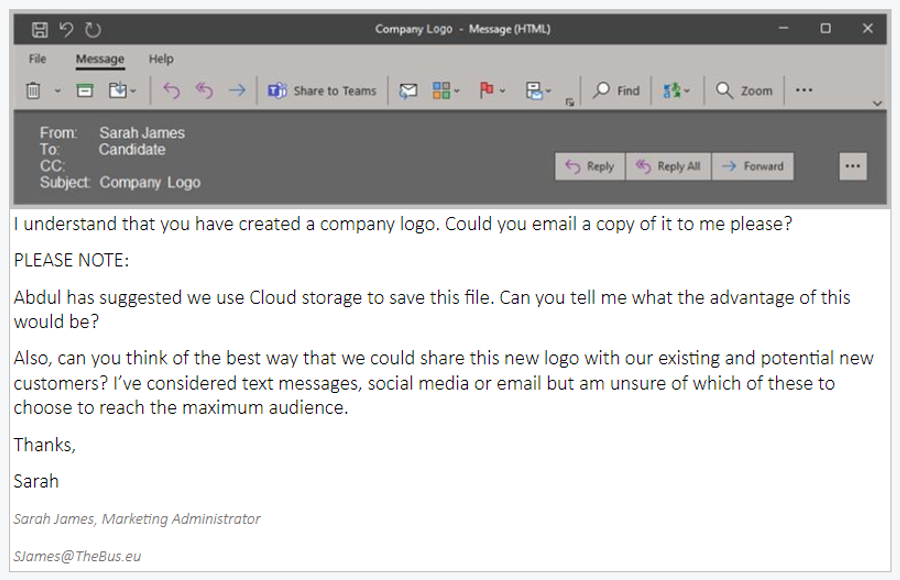
a) Open your email software / application so that you can prepare a response to the email. (1 mark)
b) Address the email to SJames@TheBus.eu. (1 mark)
c) CC the email to ASingh@TheBus.eu. (1 mark)
d) Add the subject Company Logo. (1 mark)
Make sure you follow all the instructions in the email:
d) Add the subject Company Logo. (1 mark)
- Attach the Company Logo file (1 mark)
- Answer the question in the email about the advantage of cloud storage (1 mark)
- Answer the question in the email about how best to share the logo with customers (1 mark)
You do NOT need to send the email. Instead, paste a screenshot of your finished email into your Email Evidence Document and save the file.
Upload your finished Email Evidence Document file by clicking on the Upload button below.

When you have finished Task 7 press Next.